
Categories
Tags
Archives
Ask Google Analytics Intelligence for Insights 2024
-
Set up a Demo Account
What you are looking at here is a demo account. This is free to get, and I would highly suggest you do so. You can just add this to your profile. This demo account has a ton of data. When you are running reports, it is easy to play around with this larger data set.
Analytics Intelligence
If you do not see this, it should be coming any day now. But probably 99% of you are going to be seeing this when you log in to Google Analytics. Simply click this, and what you can do is you can actually talk to Google or at least, at this point, type to Google with what kind of data you’re looking for.
I have tried a few different samples, questions, and things. Probably about 80% of them worked. You kind of got to learn what you can ask and what you cannot. I will have a link to this Help file, and it shows you some sample questions and different things you can try and cannot do. I suggest you read that. For the purposes of today’s video, let’s just run through four quick searches and see how this does.
Search 1: What is My Mobile Versus Desktop Conversion Rate?
We want to see how we’re stacking up when we are looking at desktop and mobile. You can see, obviously– usually desktop is going to convert higher, but that is a pretty large disparity. Again, this isn’t real data, but that would be a little bit alarming to me. If I go to the report — I can click right here — it will show me desktop, mobile, tablet. Got there really quickly, and I got my answer really fast.
Search 2: Did We Receive More Organic Traffic in August Year Over Year?
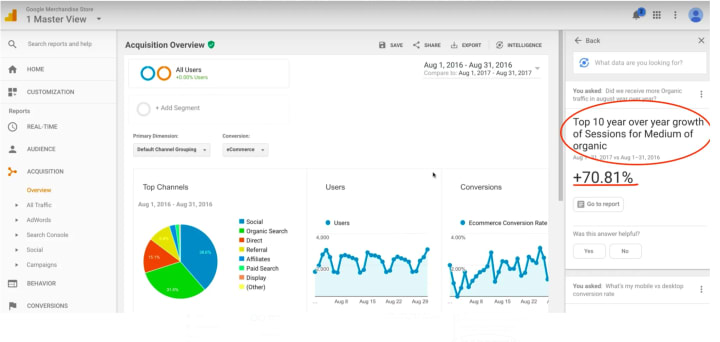
Organic Traffic in August Year Over Year Search 3: Which Social Networks Has the Most Conversions in the Past Six Months?
Now it handles this. Obviously, though, this data isn’t all set up, and it is not accurate. It is possible Google does not want to say Facebook and Twitter are beating Google Groups. Yeah……but you can see here it worked; we are just not getting as much information. If you saw something like this, you would obviously want to go into the social settings and make sure that everything is being tracked properly.
Search 4: What is my Bottom Ten Landing Pages by Page Speed?
I want to check some page speeds and see how things are loading. You can see the page load in milliseconds is showing up. When you search, you can search top or bottom, I found. That will show you good or bad.
Down in the comments, I would love for you guys to paste in some of the queries that you find that produce good reports, and we can share some of that data back and forth. I just wanted to highlight this, make sure you are aware of it, because I know it could be frustrating; you log in to Google Analytics, and you’re like, “Oh Lord. They’ve changed everything again.” Right? So, this is just a really nice, beginner-friendly way to get to the actionable data that you need to make the right decisions for your site.
I’m pumped about this new tool! Sitebulb is what we have been waiting for for a long time.Hit me up on Truradvert, let me know what you think. Any features that are missing, maybe I can pass those on to the developers or just your overall thoughts on it. I think for something that just came out, they have done a phenomenal job.