How to Use a Self-Serve Kiosk: A Step-by-Step Guide
-
In today’s fast-paced world, self-serve kiosks have become a convenient solution across many industries—from restaurants and airports to retail stores and hospitals. These interactive touch-screen machines empower customers to handle transactions independently, reducing wait times and improving efficiency.
If you’ve ever hesitated in front of a kiosk, unsure of what to press next, this guide is for you. Here, we’ll walk you through how to use a self-serve kiosk step by step, explain how they work, and share tips to make your experience seamless
What Is a Self-Serve Kiosk?
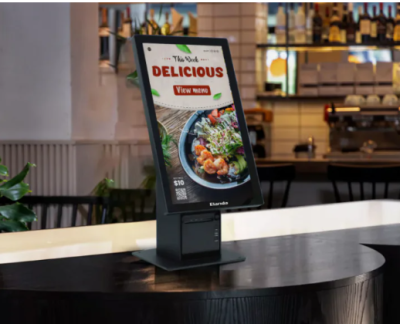
A self-serve kiosk is an automated system that allows users to perform specific tasks without the help of a staff member. Equipped with a touchscreen, card reader, and sometimes a receipt printer or barcode scanner, these kiosks make everyday processes faster and more convenient.
You’ll often find them in:
- Restaurants and cafes – for ordering food and making payments
- Airports – for check-in, boarding pass printing, and baggage tags
- Retail stores – for self-checkout and product information
- Hospitals and clinics – for patient registration and payments
- Parking lots and transportation hubs – for ticketing and payments
Why Use a Self-Serve Kiosk?
Self-service kiosks offer numerous advantages for both users and businesses.
1. Speed and Efficiency
No more waiting in long lines—kiosks streamline the process, allowing you to complete tasks in minutes.
2. Accuracy
Since you input your own details, the chances of errors in orders or data are minimized.
3. Convenience
You can browse options, customize orders, or make changes without feeling rushed.
4. Contactless Experience
Especially after the pandemic, kiosks provide a safer, contact-free alternative to traditional interactions.
5. 24/7 Availability
Many self-service kiosks operate round-the-clock, offering flexibility for users with different schedules.
How to Use a Self-Serve Kiosk: Step-by-Step
Using a self-service kiosk is simple once you understand the process. Here’s a general step-by-step guide applicable to most types of kiosks:
Step 1: Approach the Kiosk and Wake the Screen
If the screen is in sleep mode, simply touch it to activate. Some kiosks may have motion sensors that light up automatically when you approach.
Step 2: Choose Your Language
Most kiosks provide multiple language options. Select the language you’re most comfortable with for clear navigation.
Step 3: Select the Service or Product
Depending on where you are, this could mean:
- Choosing menu items at a restaurant
- Selecting a flight or train service
- Picking a product to purchase
- Registering for an appointment or ticket
Step 4: Customize Your Selection
Many kiosks let you personalize your choice. For example:
- Add or remove food toppings
- Choose seat preferences
- Modify product specifications
Step 5: Review Your Order or Input Information
Before proceeding, double-check your selections. Make sure all quantities, names, and prices are correct.
Step 6: Proceed to Payment
Kiosks typically support several payment methods:
- Credit/debit card – Insert or tap your card on the reader.
- Mobile payment – Use apps like Apple Pay or Google Pay.
- Cash payment – Some kiosks accept bills and coins.
Follow the on-screen instructions carefully, and wait for the confirmation.
Step 7: Collect Your Receipt or Confirmation
After payment, the kiosk may print a receipt, ticket, or order number. Keep it until your order or service is complete.
Step 8: Follow Up (If Needed)
In restaurants or service centers, take your printed ticket to the designated counter or wait for your number to be called. In retail, you may proceed to pick up your items or exit the checkout area.
Tips for a Smooth Kiosk Experience
- Read instructions carefully. Don’t rush—each step usually includes clear on-screen guidance.
- Keep payment ready. Prepare your card or mobile payment app before starting to save time.
- Stay alert. Watch for on-screen confirmations and receipts to ensure your transaction completes successfully.
- Ask for help if needed. Staff are usually nearby to assist if you face any technical issues.
- Keep hygiene in mind. Sanitize your hands before and after using shared touchscreens.
Common Types of Self-Serve Kiosks
1. Food Ordering Kiosks
Found in fast-food chains and cafes, these kiosks let customers browse menus, customize meals, and pay instantly.
2. Ticketing and Check-In Kiosks
Used at airports, train stations, and cinemas, these kiosks simplify ticket booking and check-in processes.
3. Retail Self-Checkout Kiosks
Supermarkets and convenience stores use these kiosks to speed up checkout, allowing customers to scan, bag, and pay independently.
4. Information Kiosks
Often placed in malls, museums, or hospitals, they help users locate services, find directions, or access schedules.
5. Bill Payment Kiosks
Allow users to pay utility bills, top up phone credit, or settle accounts without standing in line.
Troubleshooting Common Issues
Even though self-serve kiosks are designed for simplicity, you may occasionally face problems. Here’s how to handle them:
- Frozen screen: Wait a few seconds or press “Cancel” to restart.
- Payment declined: Try another card or payment method.
- Printer jam: Inform a nearby staff member.
- Wrong selection: Use the “Back” or “Edit” button before confirming.
Remember, kiosks are built for ease of use—most issues can be resolved quickly.
Conclusion
Self-serve kiosks are transforming how we shop, dine, and travel. With their user-friendly design and fast processing, they empower people to take control of their own transactions anytime, anywhere. By following these simple steps and tips, you can confidently use any kiosk without confusion or delay.
As technology continues to evolve, Elanda remains dedicated to designing smart, efficient, and reliable self-serve kiosks that make everyday experiences faster, easier, and more enjoyable.
FAQs
1. What is the main purpose of a self-serve kiosk?
A self-serve kiosk allows users to complete transactions independently, improving efficiency and reducing wait times.2. Are self-serve kiosks safe to use?
Yes. Most kiosks feature secure payment systems and data protection measures to ensure safe transactions.3. Can I use cash at a self-serve kiosk?
Some kiosks accept cash, but many now support only card or mobile payments for convenience and hygiene.4. What should I do if the kiosk doesn’t print my receipt?
Check the screen for a digital receipt option or contact nearby staff for assistance.5. Do self-serve kiosks work offline?
Most kiosks require an internet connection for transactions, but some can operate in offline mode temporarily to store data until reconnected.